

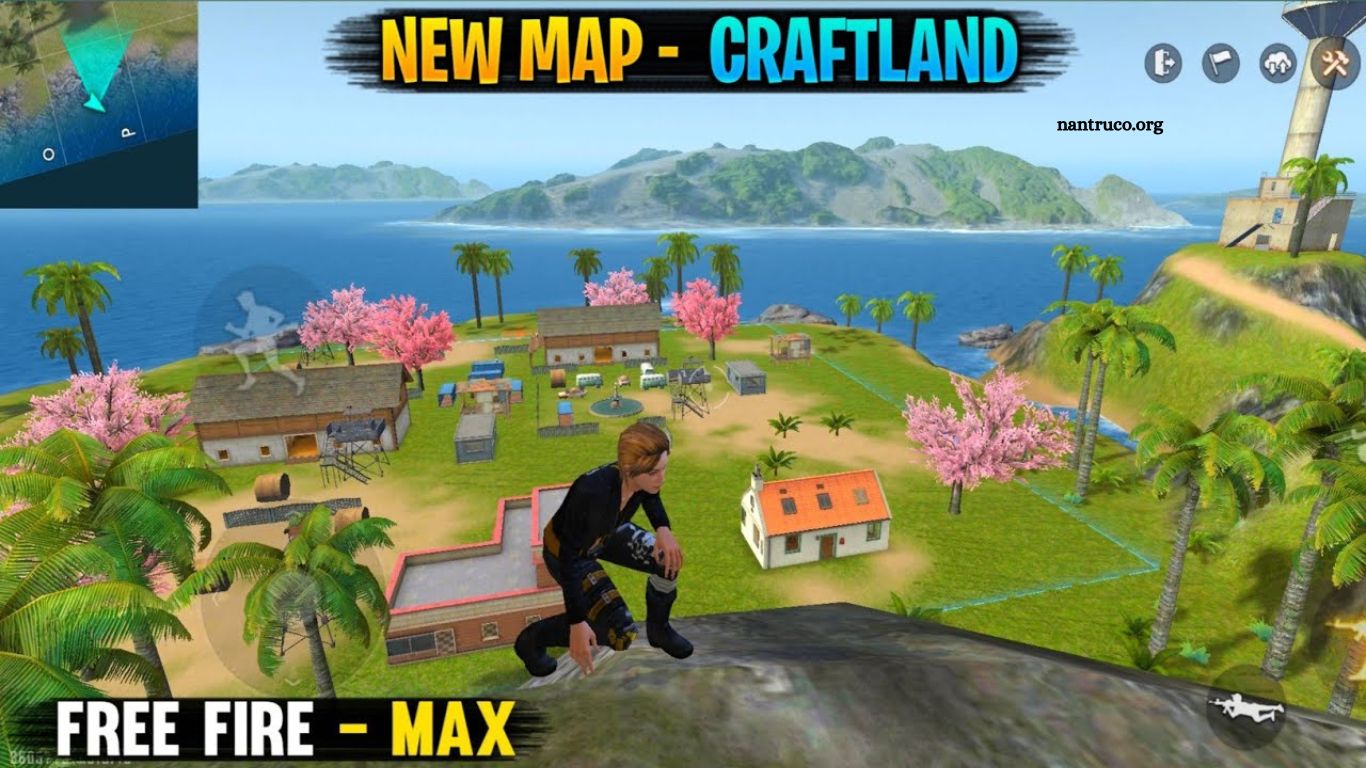
Free Fire, developed by Garena, remains one of the most popular battle royale games worldwide. One of its standout features is the Creative Mode, which allows players to design their own maps, test strategies, and sharpen gameplay skills.
Within this mode, Craftland has emerged as a favorite among players seeking innovative map layouts and strategic advantages. If you’re eager to master Craftland, this guide offers essential tips to elevate your gameplay, optimize map design, and dominate in Free Fire Creative Mode.
Read More: Free Fire Delete Photo: Guide to Remove Account Media
Understanding Craftland in Free Fire Creative Mode
Craftland is not just another map—it’s a canvas for creativity. It offers players a variety of building elements, terrain options, and environmental features to craft personalized battlegrounds. Unlike standard battle royale maps, Craftland allows players to:
- Design unique structures and layouts.
- Customize terrain and obstacles.
- Test combat strategies in a controlled environment.
- Share creative maps with the Free Fire community.
For players aiming to improve their skills or gain an edge in ranked matches, mastering Craftland is crucial. The map’s versatility enables players to simulate real-game scenarios, practice movement, and experiment with tactics that can be applied in actual matches.
Start With a Strategic Layout
The first step in crafting a powerful map is planning the layout. Start by deciding the purpose of your map. Is it designed for combat practice, competitive matches, or fun explorations? Once you determine the goal, consider these elements:
- Central Zones: Include a main area where most action occurs. This encourages engagement and strategic encounters.
- Cover Spots: Add walls, crates, and natural obstacles for players to take cover during fights.
- Pathways: Ensure multiple pathways so players can approach objectives from different angles.
- Open Areas: Balance enclosed spaces with open zones to avoid a cramped feeling.
A well-structured layout makes your map engaging and allows players to practice realistic combat scenarios.
Use Terrain to Your Advantage
Terrain is a critical aspect of Craftland. Free Fire’s Creative Mode allows players to manipulate land, hills, and water bodies. Effective terrain usage can dramatically change gameplay dynamics. Here’s how:
- High Ground: Place vantage points for snipers or long-range weapons. Players on higher terrain have a tactical advantage.
- Obstacles: Strategically place rocks, trees, and buildings to create chokepoints or ambush areas.
- Water Bodies: Adding rivers or lakes can slow down players and create natural defense zones.
- Elevation Variations: Mixing high and low ground improves map complexity and makes gameplay more challenging.
Understanding terrain mechanics ensures your map is both realistic and strategically engaging.
Optimize Resource Placement
In Free Fire, loot distribution significantly impacts gameplay. Craftland allows you to place weapons, health packs, and equipment strategically. Proper placement keeps the game balanced and exciting. Consider these tips:
- Balanced Distribution: Avoid clustering high-level weapons in one spot; spread them evenly to encourage movement.
- Hidden Loot: Place some items in less obvious locations to reward exploration and strategy.
- Accessibility: Ensure essential resources are reachable but not too easy to grab, keeping gameplay challenging.
- Variety: Mix weapons, grenades, and health kits to maintain dynamic encounters.
Optimized resource placement creates a fair and engaging experience, keeping players invested in your map.
Test Combat Scenarios
Craftland is perfect for simulating combat situations. Use Creative Mode to test different strategies, weapon combinations, and player interactions. Some effective testing methods include:
- 1v1 Duels: Practice direct combat in small arenas within Craftland.
- Team Battles: Simulate squad matches to understand team dynamics.
- Ambush Drills: Set traps and practice surprise attacks in confined areas.
- Movement Practice: Test jumping, climbing, and sprinting through complex layouts.
Regular testing ensures your map is balanced, functional, and enjoyable for all players.
Focus on Visual Appeal
While functionality is critical, aesthetics also play a role in Craftland. A visually appealing map attracts players and enhances immersion. Key visual tips include:
- Themed Designs: Use consistent themes like desert, urban, or jungle for cohesive visuals.
- Color Coordination: Match colors for buildings, terrain, and props to maintain visual harmony.
- Decorative Elements: Add small details like crates, fences, and vegetation for realism.
- Lighting: Adjust lighting and shadows to create atmosphere and mood.
A well-designed map isn’t just fun to play—it’s a pleasure to explore.
Encourage Player Movement
Dynamic maps are more engaging. Craftland maps should encourage players to move rather than stay in one spot. Strategies to promote movement include:
- Multiple Routes: Offer alternative paths to objectives or high-value loot areas.
- Interactive Elements: Use doors, elevators, or bridges that players can manipulate.
- Timed Events: Include traps or events that push players into action zones.
- Open Combat Areas: Balance tight corridors with open spaces for varied gameplay.
Movement-focused design increases engagement and prevents maps from feeling stagnant.
Leverage Creative Mode Tools
Free Fire’s Creative Mode is equipped with tools that make map-building intuitive and versatile. To maximize Craftland’s potential:
- Building Tools: Use modular walls, floors, and structures to customize maps quickly.
- Terrain Editor: Modify hills, cliffs, and water bodies for realistic landscapes.
- Object Placement: Add decorative and functional objects to enhance gameplay.
- Testing Mode: Regularly test changes in real-time to adjust gameplay balance.
Mastering these tools ensures your maps are functional, fun, and ready for the Free Fire community.
Optimize for Competitive Play
For players aiming to gain an edge in competitive matches, Craftland can simulate real battle scenarios. Focus on:
- Balanced Engagement Zones: Avoid giving one team a clear advantage with terrain or loot placement.
- Clear Objectives: Include areas for capture or control to mimic ranked gameplay.
- Choke Points and Flanks: Design areas that require strategic thinking, not just aim.
- Respawn or Training Areas: Allow practice zones where players can hone skills without leaving the map.
Maps optimized for competitive play help players improve and experiment with strategies safely.
Incorporate Player Feedback
Once your Craftland map is functional, feedback is invaluable. Engage with the Free Fire community to:
- Identify map flaws.
- Discover imbalances in loot distribution.
- Understand player navigation challenges.
- Gather suggestions for new features or designs.
Community-driven improvements make your map more popular and widely played.
Keep Updating Your Map
A successful Craftland map is never static. Regular updates keep players coming back. Update strategies include:
- Seasonal Themes: Introduce limited-time themes to keep the map fresh.
- New Obstacles: Add or remove structures to improve gameplay.
- Balancing Loot: Adjust loot placement based on player data.
- Bug Fixes: Ensure smooth gameplay by resolving issues promptly.
Frequent updates maintain interest and ensure your map remains relevant in Free Fire Creative Mode.
Common Mistakes to Avoid
Even experienced players make mistakes when designing Craftland maps. Avoid these pitfalls:
- Overcrowding: Too many structures can make movement difficult.
- Unbalanced Loot: Placing high-tier weapons in one area can ruin gameplay.
- Ignoring Terrain: Flat maps without elevation reduce tactical depth.
- Neglecting Testing: Not testing the map can lead to unfair advantages or glitches.
- Aesthetic Neglect: Maps that look dull or chaotic can deter players from exploring.
Awareness of these mistakes ensures your map is enjoyable, balanced, and competitive.
Frequently Asked Questions
What is Craftland in Free Fire Creative Mode?
Craftland is a customizable map within Free Fire Creative Mode where players can design, test, and play unique battlegrounds. It allows players to experiment with terrain, structures, loot placement, and combat strategies.
How do I start building a map in Craftland?
To start, enter Free Fire’s Creative Mode, select Craftland, and choose the terrain and building elements. Begin by planning the layout, placing cover spots, and designing pathways for dynamic gameplay.
Can I practice combat skills in Craftland?
Yes! Craftland is perfect for practicing combat scenarios. You can simulate 1v1 duels, squad battles, ambushes, and movement drills to improve your in-game strategies.
How should I place loot on a Craftland map?
Distribute loot evenly to avoid giving players unfair advantages. Place some items in hidden or hard-to-reach spots to encourage exploration. Include a variety of weapons, grenades, and health kits to maintain balanced gameplay.
Are there tools to enhance map design in Craftland?
Free Fire’s Creative Mode offers terrain editors, modular building tools, object placement, and testing modes. These tools allow you to customize the map layout, adjust elevations, and test gameplay in real-time.
How can I make my Craftland map more competitive?
Focus on balanced engagement zones, multiple pathways, strategic chokepoints, and loot distribution. Testing the map with squads and adjusting based on feedback ensures a fair and competitive experience.
Conclusion
Mastering Craftland in Free Fire Creative Mode requires a mix of strategy, creativity, and testing. By carefully designing layouts, optimizing terrain and loot, and focusing on dynamic player movement, you can create maps that are both fun and competitive. Remember, aesthetics and community feedback are just as important as functionality. With regular updates and attention to detail, your Craftland map can become a favorite among Free Fire enthusiasts.
