
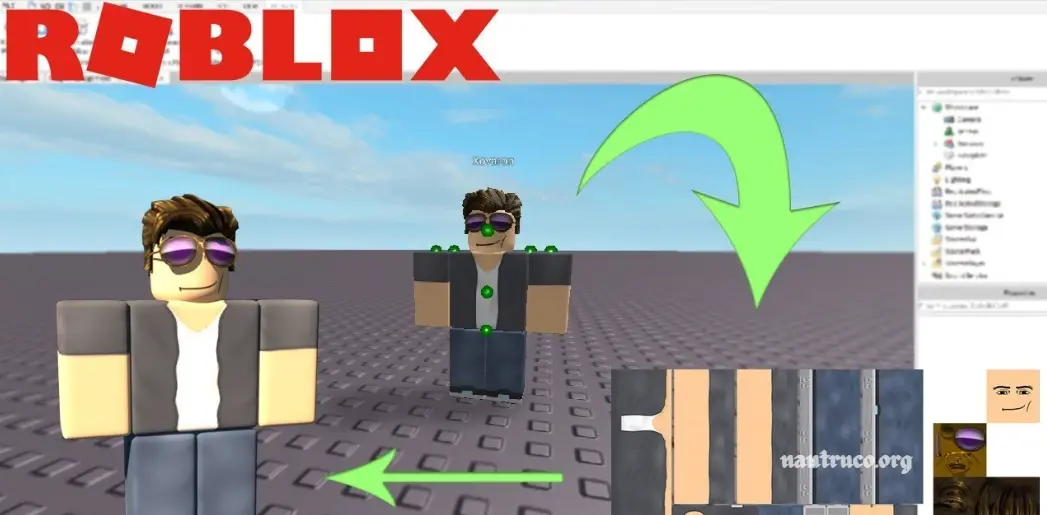
Roblox is a dynamic online gaming platform where users not only play but also create and share immersive experiences. One of its most exciting features is character customization—players can design and apply unique, original skins to personalize their avatars. In this guide, you’ll learn how to create your own custom Roblox skins, along with expert tips and techniques to help elevate your designs and stand out in the Roblox universe.
What is Roblox?
Roblox is an online platform and game creation system that allows users to play, build, and share games and virtual experiences. Launched in 2006, it’s more than just a gaming platform—it’s a vast, user-driven ecosystem where anyone can design their own 3D worlds using Roblox Studio, the platform’s powerful development tool.
What sets Roblox apart is its focus on creativity and social interaction. Millions of games across genres—adventure, simulation, roleplay, obbies, and more—are built by the community, not by a central developer. Players can customize their avatars, trade virtual items, earn Robux (the in-game currency), and even monetize their creations.
At its core, Roblox is a creative playground, social hub, and launching pad for aspiring developers, where imagination fuels the experience.
Roblox Developer Hub
The Roblox Developer Hub is the official resource for creators. It offers step-by-step documentation on how to design, upload, and apply custom clothing, including shirts, pants, and layered clothing. This is the best place to start if you’re looking for reliable, up-to-date information directly from Roblox.
YouTube Tutorials
YouTube is filled with thousands of Roblox skin design tutorials, ranging from beginner guides to advanced techniques. Popular creators often walk you through:
- Designing skins using free tools like Pixlr or Photopea
- Exporting Roblox clothing templates
- Uploading custom designs to the Roblox platform
- Tips for aligning textures and adding detail
Recommended YouTube search terms:
- “How to make a Roblox shirt”
- “Roblox skin design tutorial”
- “How to use Roblox clothing templates”
Community Forums & Discord Servers
Platforms like the DevForum (official Roblox community) and fan-run Discord servers often feature helpful guides, downloadable templates, and design tips shared by experienced creators. These communities are great for asking questions and getting real-time feedback on your work.
You may also like it:
What Are The Most Popular Roblox Skins?
What Games Similar To Roblox Do You Recommend?
Are There Any Hacks Or Cheats To Get More Robux In Roblox?
Online Design Tools and Templates
Websites like:
- Photopea (a free Photoshop alternative)
- Pixlr
- Canva (for basic layout)
…allow you to edit Roblox clothing templates easily. Some sites also offer pre-made templates to help you learn by customizing existing designs.
Udemy & Online Courses
For a more structured learning path, platforms like Udemy and Skillshare offer full courses on Roblox game development and avatar customization. These may include modules on skin creation, asset design, and publishing your work on the marketplace.
Tips for Success
- Use Roblox’s Clothing Templates: Always start with the official shirt or pants template to make sure your design fits correctly.
- Test in Studio: Use Roblox Studio to preview how your skin will look in-game.
- Stay Within Guidelines: Roblox has strict rules about what’s allowed in user-created content, so check the Community Standards before uploading.
Frequently Asked Questions
Do I need to know how to code to create skins in Roblox?
No. Creating skins or custom clothing in Roblox doesn’t require any coding. You’ll be working with image-editing software to design textures, using templates provided by Roblox. Coding is only needed if you’re creating games or advanced avatar behaviors.
Where do I get the official Roblox skin templates?
You can download the official shirt and pants templates directly from the Roblox Developer Hub or by searching “Roblox clothing template” on the Roblox Create website. These templates help ensure your designs fit the character models correctly.
Can I preview how my skin will look before uploading it?
Yes. Roblox Studio allows you to test and preview clothing on avatars before uploading. This helps catch alignment issues or sizing problems early on.
Are there any free courses or classes I can take?
Yes. Platforms like YouTube, Roblox Developer Hub, and even free courses on Udemy, Coursera, or Skillshare (sometimes with free trials) offer step-by-step lessons on skin and clothing design.
Can I sell or share the skins I create?
Absolutely. Once your design is uploaded and approved, you can choose to sell it on the Roblox Marketplace. However, you’ll need a Premium Membership to sell clothing for Robux.
Conclusion
Creating your own skins in Roblox is a fun and creative way to personalize your avatar and explore digital design. Whether you’re a beginner or looking to refine your skills, there’s no shortage of helpful tutorials available online. From the official Roblox Developer Hub to step-by-step YouTube videos, design tools like Photopea and Pixlr, and active community forums, you have everything you need to learn and grow.
By exploring these resources, practicing with templates, and getting involved in the Roblox creator community, you’ll not only master skin creation-you’ll unlock new ways to express your style, share your work, and even earn Robux through your designs. Keep experimenting, keep learning, and most importantly, have fun bringing your ideas to life!
